Social Bookmarking Gadgets plays important role in boosting blog traffic.Thats why you may found social bookmarking gadgets almost on every blog/website.Today we are sharing a cool social bookmarking gadget designed by Chandeep and which works with jQuery.This gadget scrolls along with page and when any user hovers on icon,some social bookmarking buttons like facebook like button,twitter tweet button,stumbleupon submit button and digg’s digg it button.Also the installation of this gadget is damn easy,now lets see how to add it to blogger blog.See the demo of gadget first.
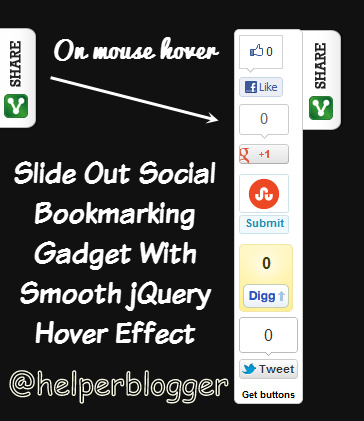
How To Add Slide Out Bookmarking Gadget To Blogger?
For better understanding I am dividing this tutorial in 3 simple steps,just follow them carefully and you will add this gadget very easily to your blog.
Step 1 : Adding jQuery Plugin
Step 2 : Adding Google +1 Button Script
Step 3 : Adding the Gadget
Step 1 : Adding jQuery Plugin
Note – Ignore this step,if you have already added jQuery plugin to your blog.
- Go to Blogger Dashboard > Template
- Click Edit HTML
- Hit Proceed
- Now find below code in your template
add below code just above it
Step 2 : Adding Google +1 Button Script
Find below code in your temlate
add below code just below of above code
http://apis.google.com/js/plusone.jsStep 3 : Adding the Gadget
- Now go to Page Layout
- Click on Add a Gadget
- Select HTML/JavaScript
- Leave title field blank
- Paste below code and save it
- Drag the widget to bottom of your page.
- Finally save your changes
/*<![CDATA[*/
jQuery(document).ready(function () {
jQuery(".hbslidebox").hover(function () {
jQuery(this).stop().animate({
left: "0"
}, "medium");
}, function () {
jQuery(this).stop().animate({
left: "-70"
}, "medium");
}, 500);
});
/*]]>*/
.hbslidebox {
background: url("http://3.bp.blogspot.com/-Dbq2keEcGbs/T7seLQzzy8I/AAAAAAAAByY/6olpRUktfhE/s1600/helperblogger.com-tab_left_vertical.png") no-repeat scroll right top transparent !important;
display: block;
float: left;
height: auto;
padding: 0 45px 0 0px;
width: 65px;
z-index: 99999;
position:fixed;
left:-70px;
top:20%;
}
.hbslidebox div {
border:none;
position:relative;
display:block;
}
#floatingbuttons {
background: #fff;
border-radius: 5px 5px 5px 5px;
border: 1px solid #CCCCCC;
float:left;
padding:0 0 3px 0;
bottom:15%;
z-index:399;
}
#floatingbuttons .floatbutton {
float:left;
clear:both;
margin:5px 4px 0 4px;
}
.addbuttons {
clear:both;
text-align:center;
padding-top:5px;
}
.addbuttons a span.getfloat, .addbuttons a span.sharebuttons {
color:#000;
background:none;
font-family:arial, sans-serif;
display:block;
font-size:9px;
font-weight:bold;
text-decoration:none;
line-height:11px;
}
.addbuttons a:hover span {
color:#fff;
background:none;
text-decoration:underline;
}
 gamecrackster