
How To Download IDM Automated Sequential One by One – Tricks to make a list or download list is actually quite simple and not as complicated as you think. If you do not want to bother downloading process restarted after other file-download is completed, and wanted to make the link part seemed to single link, then this tutorial should you practice. In addition to its function to increase the download speed and resume, IDM also allows us to download a lot of files. As for how you should do to make the schedule queue or download alternately as follows.
Tutorial
1. When you are already in a file hosting site and click on the link provided, do not select start the download, but the Download Later .
1. When you are already in a file hosting site and click on the link provided, do not select start the download, but the Download Later .
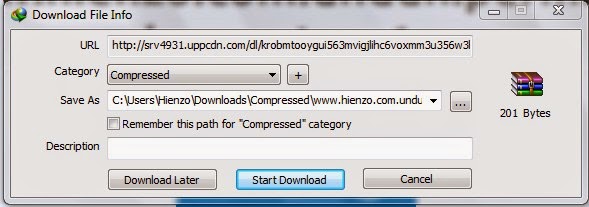
2.Terapkan step number 1 on another link to activate Queue .
3.Buka previously IDM software that you have installed in your pc or laptop.
4. Select menu Scheduler with clock icon.
3.Buka previously IDM software that you have installed in your pc or laptop.
4. Select menu Scheduler with clock icon.

5. Click the tab Files in the queue .
6.Pastikan on a column of files at the same time you choose one.
6.Pastikan on a column of files at the same time you choose one.
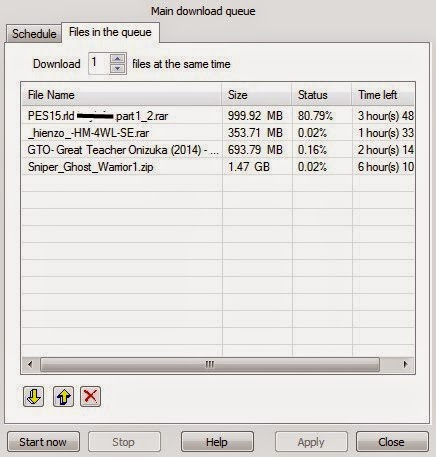
7.Apabila there are files you do not want to download, click on the file in question, and then select the red cross mark.
8.File the top is first downloaded, please set at will by drag & drop. Hold left click on the file you want on-precedence, and swipe up.
9.Klik Start now to start Queues Project. You may close the window IDM, because the download process runs in the system tray.
10.Untuk pause or pause the download, simply click Stop.
8.File the top is first downloaded, please set at will by drag & drop. Hold left click on the file you want on-precedence, and swipe up.
9.Klik Start now to start Queues Project. You may close the window IDM, because the download process runs in the system tray.
10.Untuk pause or pause the download, simply click Stop.
If all the download has finished, open IDM and right click on any file whose status is complete, open the folder and select. If not complete, simply right-click and select resumes downloads.Maybe that’s all about How to Make a List Download IDM . Hopefully helped by this article.
 gamecrackster