
Rar files are corrupted is often the case, especially downloaded from Media Fire. For how to fix or resolve it, please refer to the tutorial that I have provided below. I was inspired to make this post because there are visitors who are having problems with corrupted files downloaded from this blog, especially the download via mediafire. Hopefully successful and beneficial to those who need them.
Here’s how:
1. Open Application Winrar , find the zip file is corrupted in the folder where you saved it, and then click 1x (currently in winrar).
2. If you want fast, 2x click on the file is corrupt or right-click and open with winrar.
2. If you want fast, 2x click on the file is corrupt or right-click and open with winrar.
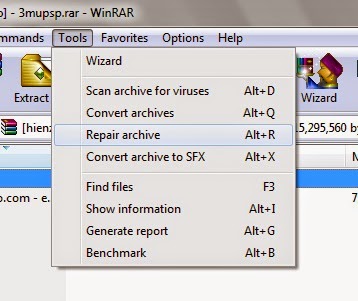
3. Click Tools select Repair Archive or press Alt + R on the keyboard.
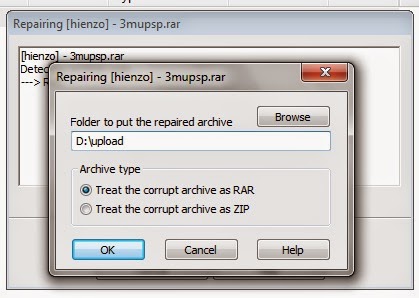
4. Select Treat the corrupt archive as RAR . If Treat the corrupt archive as a ZIP file format zip / 7z “.
5. Click OK .
6.Tunggu some time until the process is complete and a message appears done!
7.Ganti corrupted file names as they are, because if it had been in the repair will change.
7.Ganti corrupted file names as they are, because if it had been in the repair will change.
Notes:
- This method will work 100% work if the uploader tick menu Add recovery record before compressing files (Add a data recovery 5%)
- If you do not want to corrupt do not ever change the name of the file / part which would be merged.
 gamecrackster