How to Convert CD / DVD to ISO format can be done very easily, even the process ofconverting to an ISO file spelled out pretty quickly. For those of you who want to create an ISO file / image as a solution so that the DVD is not easily damaged because it is used constantly to play Game PS1 and PS2 , then you are right visit here. And as the tutorial I use software that is powerful enough, that UltraISO .
UltraISO is a software that serves to edit, compress, convert and Make ISO file from CD / DVD RW. Another plus is that it can be used for the Mount and the Burn CD / DVD Image.
2.Instal UltraISO. If the Welcome message appears, then select Enter Registration Code and open the file serial to fill it.
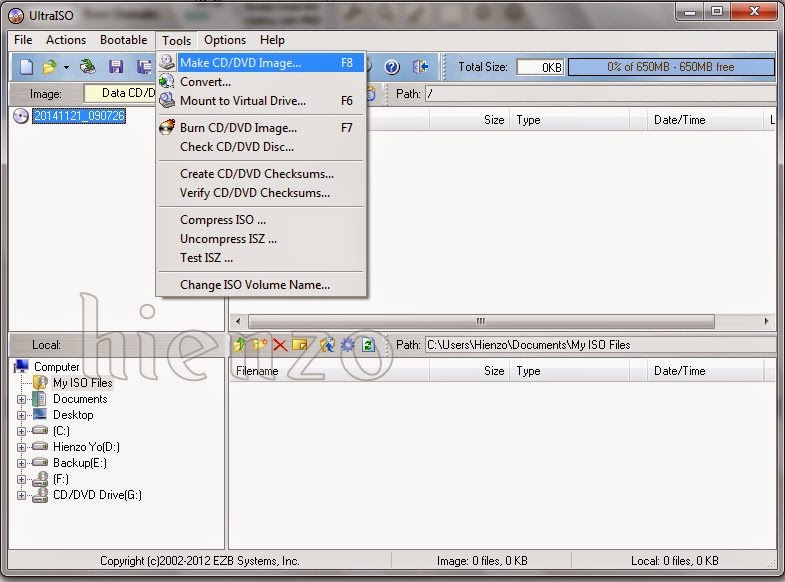
3. Open UltraISO and click to open the Tools Menu.
4. Select Make CD / DVD image or if you want to quickly press F8.
3. Open UltraISO and click to open the Tools Menu.
4. Select Make CD / DVD image or if you want to quickly press F8.
Information
- CD / DVD Drive: Drive which will be converted into ISO, for example I chose F.
- Read options: Just check the Enable ISO Volume Filter.
- Output FileName: Name of the outcome convert ISO files.
- Output Format: Standard ISO (.ISO), BIN (.BIN / .cue), Nero (.NRG), Compressed ISO (.ISZ), Alcohol (.MDF / .MD5), CloneCD (.img / .CCD /. SUB). Please specify as needed, but I recommend the extension ISO.
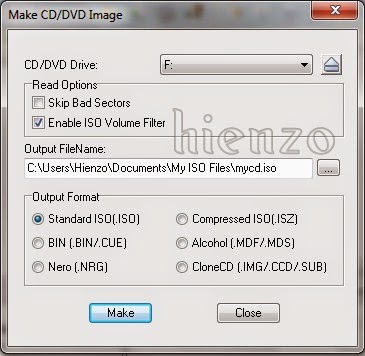
Last 5.Langkah is click the Make button and wait until progress is complete.
Hopefully Helpful ^ _ ^
 gamecrackster